Security Scan
reins scan audits your local agent environment for high-signal security misconfigurations, writes an HTML report to ~/Downloads/scan-report.html, and prints a file:// link in the terminal.
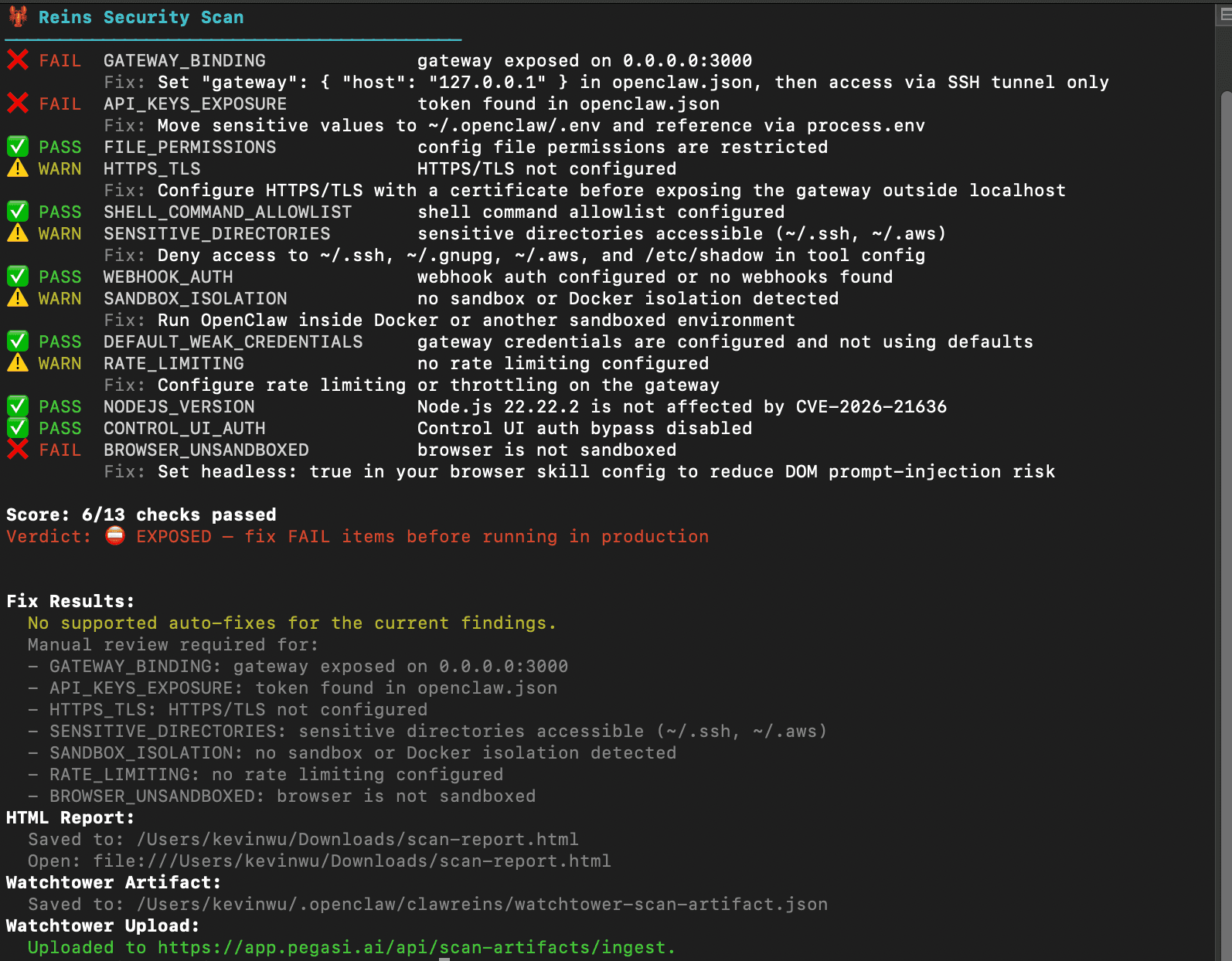
Usage
reins scan                          # Run 13-check audit + save HTML report
reins scan --html                   # Save report and try to open automatically
reins scan --json                   # Machine-readable output for CI
reins scan --fix                    # Backup config and apply supported remediations
reins scan --fix --yes              # Apply fixes without confirmation prompt
reins scan --monitor                # Compare against last saved baseline
reins scan --monitor --reset-baseline          # Accept current config as new baseline
reins scan --monitor --alert-command <cmd>     # Run notifier on drift
Security Checks
| Check | Severity | Detects | Auto-fix |
|---|---|---|---|
GATEWAY_BINDING | Critical | Gateway listening on 0.0.0.0 or missing localhost binding | Yes |
API_KEYS_EXPOSURE | Critical | Plaintext API keys, tokens, or secrets in config files | No |
FILE_PERMISSIONS | Critical | Config files readable by group or other users (not 600) | Yes |
HTTPS_TLS | Warning | Missing HTTPS/TLS configuration | No |
SHELL_COMMAND_ALLOWLIST | Critical | Missing safeBins allowlist / unrestricted shell execution | Yes |
SENSITIVE_DIRECTORIES | Warning | Agent can reach ~/.ssh, ~/.gnupg, ~/.aws, or /etc/shadow | No |
WEBHOOK_AUTH | Warning | Webhook endpoints without auth tokens or shared secrets | No |
SANDBOX_ISOLATION | Warning | No Docker or sandbox isolation detected | No |
DEFAULT_WEAK_CREDENTIALS | Critical | Default, weak, or missing gateway credentials | No |
RATE_LIMITING | Warning | No gateway rate limit configured | No |
NODEJS_VERSION | Critical | Node.js versions affected by CVE-2026-21636 | No |
CONTROL_UI_AUTH | Critical | Control UI auth bypass flags enabled | Yes |
BROWSER_UNSANDBOXED | Critical | Browser config missing headless: true or sandbox: true | No |
Exit codes:
0=SECURE1=NEEDS ATTENTION2=EXPOSED
Auto-fixes
When --fix is used, Reins creates a timestamped backup in ~/.scan-backup/ before applying:
- Rebinding gateway host from
0.0.0.0to127.0.0.1 - Tightening config file permissions to
600 - Injecting a default
tools.exec.safeBinsallowlist - Disabling
authBypass/skipAuth/disableAuthflags
Drift Monitoring
Drift monitoring compares the current scan against a saved baseline and alerts when posture worsens or config changes.
reins scan --monitorThe first run saves scan-state.json and config-base.json to ~/.openclaw/clawreins/. Later runs diff against them.
Use --reset-baseline when you intentionally want the current state to become the new base.
Alert command
Pass --alert-command to run a notifier when drift is detected. Reins sets these environment variables for the notifier:
CLAWREINS_SCAN_SUMMARY
CLAWREINS_SCAN_VERDICT
CLAWREINS_SCAN_REPORT_PATH
CLAWREINS_SCAN_REPORT_URL
CLAWREINS_SCAN_STATE_PATH
CLAWREINS_SCAN_CONFIG_BASELINE_PATH
CLAWREINS_SCAN_WORSENED_CHECKS
Example:
reins scan --monitor --alert-command "$HOME/bin/send-alert.sh"Scheduled runs
Recommended cron setup (daily, 9am):
0 9 * * * /usr/bin/env \
  HOME=$HOME \
  OPENCLAW_HOME=$HOME/.openclaw \
  /usr/local/bin/reins scan --monitor \
  --alert-command "$HOME/bin/send-alert.sh" \
  >> $HOME/.openclaw/clawreins/scan-monitor.log 2>&1
Guidelines:
- Run once per day with
--monitor - Never use
--fixin scheduled jobs - Set
HOMEandOPENCLAW_HOMEexplicitly in cron environments